

22. The HDF5 file format#
22.1. General conditions#
Data must be provided through an HDF5 file, structured as detailed below. When exporting an HDF5 file from NaxToPy, it will follow this same structure.
The HDF5 file distinguishes between two types of information: result data and metadata. Metadata can be either mandatory or optional. Although NaxToPy populates all metadata fields automatically on export, not all fields are required when importing.
22.1.1. Conventions for strings#
Important
All string values in attributes and datasets must be stored as variable-length strings with UTF-8 encoding and NULL-terminated in HDF5:
HDF5 type:
String, length = variable,cset = H5T_CSET_UTF8,padding = H5T_STR_NULLTERM.Fixed-length strings are not allowed (avoid space-padding and truncation issues).
Applies to all textual attributes:
SOFTWARE,DESCRIPTION,SUBTITLE,TYPE,PART, etc.

Fig. 1 Example of attributes DESCRIPTION and TYPE stored as variable-length (String, length = variable), UTF-8, NULL-terminated strings.#
22.2. Root file attributes /#
Attribute |
Value |
Description |
|---|---|---|
|
|
Indicates the software used to generate the file (NAXTO, NAXTOVIEW, NAXTOPY, etc.). |
|
Free text string (Optional) |
General description of the HDF5 file content. |
|
|
File creation date. |

Fig. 2 Attributes of the HDF5 root group /.#
22.3. Hierarchical group structure#
The HDF5 file follows a hierarchical structure composed of several groups:
22.3.1. NAXTO group#
Main data container. This group is required and must be named exactly NAXTO.
Attribute |
Value |
Description |
|---|---|---|
|
|
Version of the exported HDF5 schema. |
|
|
Assembly version number. |

Fig. 3 Attributes of the NAXTO group.#
22.3.2. RESULTS group#
This group is required and must be named exactly RESULTS. It contains the load cases.
22.3.2.1. Load case group X#
This group represents the results for load case X, where X is the load case identifier.
Attribute |
Value |
Description |
|---|---|---|
|
|
Generic description of the load case. |
|
|
Numerical identifier of the load case. |
|
|
Solution type (e.g., linear static, such as Nastran SOL101). Type: |
|
|
Load case subtitle. |

Fig. 4 Attributes of the load case group X.#
22.3.2.2. Increment Y#
This group represents increment Y within the load case, where Y is the increment identifier.
Attribute |
Value |
Description |
|---|---|---|
|
|
Free text. |
|
|
Increment number. |
|
|
Increment value ( |

Fig. 5 Attributes of increment Y.#
22.3.2.3. Result RESULT_NAME#
This group represents one result type within an increment. The group name, RESULT_NAME, is a user-defined identifier such as STRESS or DISPLACEMENT.
Attribute |
Value |
Description |
|---|---|---|
|
Free text string (Optional) |
Result description. |
|
|
Type of result. |

Fig. 6 Attributes of result RESULT_NAME.#
Important
For any given RESULT_NAME, all child sections must expose datasets with an identical compound schema:
Same member names and order (e.g.,
ID ENTITY,XX,XY,YY,VON_MISES,MAX_PRINCIPAL,MIN_PRINCIPAL, andID NODEwhen applicable).Same base types and shapes (e.g.,
ID NODEmust beint32[4]in all sections if present).Same floating-point precision for all component members (either all
float32or allfloat64).
Only the dataset row count and the PART attribute may differ between sections. Files that violate this rule are invalid for that result.
22.3.2.4. SECTION1 group#
The number of section groups (SECTION1, SECTION2, …) corresponds to the number of result sections in the data.
Attribute |
Value |
Description |
|---|---|---|
|
Free text string (Optional) |
Description of the result set in this section. |

Fig. 7 Attributes of the SECTION1 group.#
22.4. Dataset PART_NAME#
Each section group (e.g., SECTION1) contains one dataset with a user-defined name, represented here as PART_NAME.
Warning
The dataset must have exactly 1 dimension. A 2-dimensional dataset will cause NaxToView to fail or misinterpret the data structure.

Fig. 8 Number of dimensions of the dataset.#
Attribute |
Value |
Description |
|---|---|---|
|
Free text string (Optional) |
Description of the data stored in the dataset. |
|
Free text string (Mandatory) |
A tuple identifying the part. See format note below. |
Important
The PART attribute must follow the exact format (integer, 'PartName') — parentheses and single quotes are mandatory. Example: (0, 'Part_1_1'). Invalid alternatives include square brackets [], double quotes "", or omitting the quotes entirely.
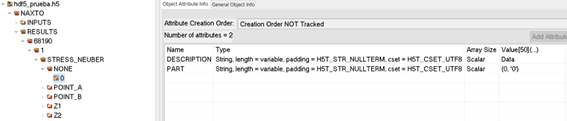
Fig. 9 Attributes of the dataset.#
Member |
Type |
Description |
|---|---|---|
|
|
Element identification number. |
|
|
Associated node IDs (only present when |
|
|
XX result component. |
|
|
XY component. |
|
|
YY component. |
|
|
Von Mises stresses. |
|
|
Maximum principal stress. |
|
|
Minimum principal stress. |
Important
All component values must use the same floating-point format — either all float32 or all float64. Mixing formats will cause an error when the model is loaded.
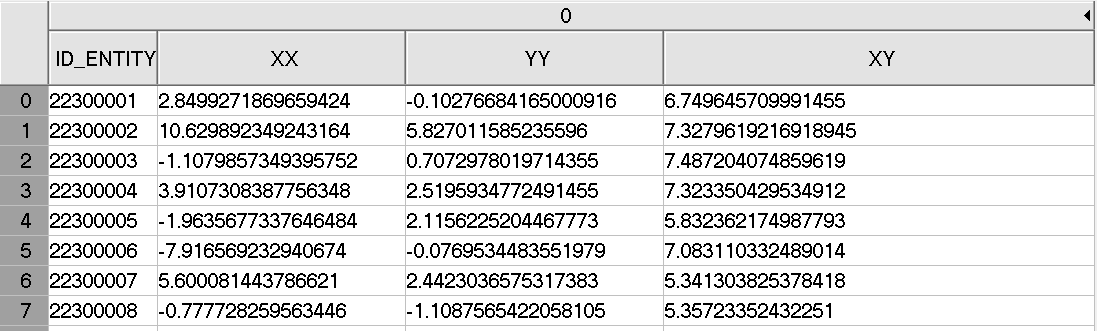
Fig. 10 Example of dataset PART_NAME.#
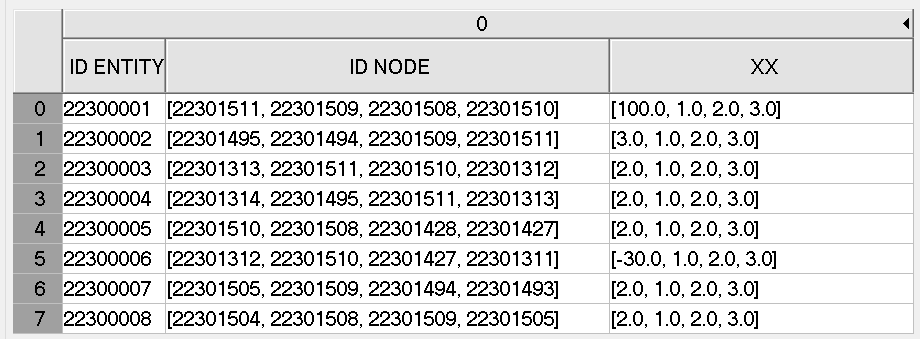
Fig. 11 Example of dataset PART_NAME — Element Nodal.#